Results (1417 found)
Page
Symphony Config | Quick-Start Assistant for Success
Symphony Config No time for manuals? Then Symphony Config is just perfect for you! Configuring an intercom system has never been easier – and, above all, it has never been faster. Mesh systems with Symphony MX devices can now be configured in no time at all with the self-explanatory configuration —no manual, no detours. This release of Symphony Config is just the beginning. It marks the start of a future in which intercom configuration will be as simple and clear as communication itself. Overview Video Benefits Corporate Building Q & A Supported Devices Get started in no time with the Quick Start Assistant With the step-by-step assistant and just a few clicks, the devices automatically connect to a communication network (mesh/registrarless). They are automatically recognised as call triggers (e.g. entrance) and receivers (e.g. reception) – or can be easily assigned using drag & drop. In the next step, the button labels and call destinations are defined, and communication is ready to go. Changes made easy Settings such as audio presets, volume and other parameters can now be adjusted for multiple devices simultaneously – quickly, uniformly and efficiently. This makes even extensive system adjustments a breeze and ensures consistency across all devices. The multiple editing functions will be gradually expanded in future releases. Staging touch displays brilliantly Depending on the application, you can select a suitable layout and design it with a background image from the new media database. Of course, you can also upload your own images from your company or institution – for a look that perfectly matches your brand and identity. Layout Possibilities Overview and Control with System Management This is where it all begins: Symphony Config starts in System Management, where companies, projects, locations, devices and users are managed centrally. The dashboard provides a real-time overview of all relevant information, such as the current device status. Role and permission management allows companies to efficiently organise their own structure with multiple projects and locations. Integrators maintain an overview of all customer projects and can provide targeted support – quickly, transparently and securely. More about System Management Video How fast can you configure a system? Benefits for Integrators Your time, cost and competitive advantage Fast and efficient implementation and fewer technician hours Basic technical knowledge sufficient for implementation (minimal training) Cost advantage for straightforward projects Clear management and monitoring of customer projects Users can make simple adjustments themselves Higher customer satisfaction with the solution Technicians can focus on complex solutions Thanks to Active Device Management* , devices in customer projects always remain up to date – with minimal effort, you can increase protection against cyber threats. Fine-tuning for Experts The extensive functions and options of Commend devices require specialist knowledge – a job for the experts. They carry out advanced configurations, such as action sequences, directly on the device as usual. Benefits for Users and Customers Make it your own instead of just using it – easily customise it yourself Fast implementation Simple adjustments and changes to call destinations or contacts can be made by the user themselves – at no extra cost. Designing the background image so that the brand and identity are showcased brilliantly at every touchpoint. Thanks to Active Device Management* , devices are always up to date – including new features and optimal protection against cyber threats. Easy to use – allowing users to manage their own systems Thanks to the roles and permissions in System Management, users have direct access to Symphony Config and can make simple adjustments themselves – without technicians, without waiting times, without additional costs. Whether audio presets for better speech intelligibility, background images or the management of contacts and profile pictures – all changes can be made intuitively and securely. *Active Device Management requires an active internet connection and an active subscription to this cloud service. Information about Active Device Management Use Case Corporate Building Facts and Questions What is ‘Mesh’? What is ‘Mesh’? Symphony MX devices (od10, od5, im3, etc.) have smart features and, when directly connected, form an autonomous, smart communication network – registrarless and therefore independent of central infrastructure such as a server. Symphony Mesh Details Do I need a Symphony Cloud account? Do I need a Symphony Cloud account? Yes – simply sign up and get started. Symphony Config is a cloud service and is required for project and system management (companies/sites). Sign up for Symphony Cloud Do I need an internet connection for configuration and ongoing operation? Do I need an internet connection for configuration and ongoing operation? An internet connection is required for the initial configuration and subsequent adjustments. No internet connection is required for configurations directly on the devices. No internet connection is required for ongoing operation. Without an internet connection, automatic updates, device monitoring and notifications are not possible. Why do I need a claiming code and where can I find it? Why do I need a claiming code and where can I find it? The packaging of Commend intercoms and modules contains the ‘Device Identification Document’ (see symbolic image), which includes the claiming code and other important information such as the serial number and MAC address. The claiming code is required to add devices to the Symphony Cloud and also for Symphony Config. Please note: This document with the claiming code is very important, so make sure it does not get lost during unpacking and installation. How do the devices receive their IP address? How do the devices receive their IP address? The devices receive their IP address via DHCP (Dynamic Host Configuration Protocol). The automatically assigned addresses can then be permanently assigned. This is particularly useful and necessary for interaction with other applications and systems, such as for video streams or device API connections. How many intercom stations can I connect? How many intercom stations can I connect? Mesh systems support up to 9,999 devices. Depending on the size of the system and the application, we recommend an on-premises server , which offers professional control station functions as well as single-point integration with third-party systems. Does “mesh” have a queue for multiple calls? Does “mesh” have a queue for multiple calls? Devices can manage up to 20 incoming calls, allowing you to switch between calls and forward calls. Professional control room functions such as priorities require an on-premises server. How can I configure the advanced settings? How can I configure the advanced settings? All settings can be configured directly on the individual devices as before. How do I configure a door opener? How do I configure a door opener? These are configured automatically. Can I use cloud services such as mobile or web clients? Can I use cloud services such as mobile or web clients? These features are not currently available and are planned for a future release. Supported Devices Symphony MX (SymMX) Stations with touchscreen od10 outdoor station od5 outdoor station id5 indoor station for wall and desk id8 indoor station for wall and desk Vandal resistant stations WS 300V CM stations WS 311V CM DA stations for accessibility WS 311V CM emergency call stations Stations od1 stations with and without camera Modules im6 with support for touch displays and cameras im3 with camera support
Page
Reus Mobilitat i Serveis | Smart Mobility Solution
Success Story: Secure access in parking Reus Mobilitat i Serveis Overview Challenge Solution Result Free download Challenge Reus Mobilitat i Serveis operates a network of ten car parks, all monitored and managed remotely from a Central Control Room. To improve security, RMS planned to keep both vehicle and pedestrian doors closed around the clock in several facilities. This required a pedestrian access control system capable of identifying users without the need to call the control center. The goal was to ensure 24/7 smooth and secure access, reduce unnecessary calls, and improve the overall user experience. The project initially covered two parking facilities, with plans to expand to additional sites in the future. Customer Information RMS is Reus’s municipal mobility company, managing car parks, on-street parking, urban transport, and related services with a focus on innovation and sustainability. Reus, known for its modernism and heritage, is often looked to for smart city management. More info Solution Depending on the entrance characteristics, Reus Mobilitat i Serveis installed either an ID5 indoor intercom station or an OD5 outdoor intercom station. To ensure accessibility and visibility, the stations automatically switch from announcement mode to keypad mode when someone approaches. Even users unfamiliar with such devices are guided intuitively by the design and the screen’s activation. Through the intercom station, customers simply enter their license plate number on a web form displayed on the screen. A script then verifies whether the vehicle is inside the facility. If confirmed, the pedestrian door opens, and an authorization message is displayed. For additional support, the call button was configured to connect users directly to the control center if the system does not recognize the license plate. This solution combines automation with a smart, user-friendly interface to provide intuitive and efficient access. Importantly, RMS already manages license plate recognition data centrally, so the system only facilitates the decision-making process. Commend acts not as an access control provider, but as an enabler of smart infrastructure. Result Reus Mobilitat I Serveis chose Commend for its comprehensive range of SIP-based solutions and its reputation for long-term, future-proof systems. After visiting the Commend’s stand at last year’s Smart City Expo, they were particularly impressed by the flexibility of the intercom screens — particularly their ability to display any desired content with full control, as well as their large size, which allows both the text box and the alphanumeric keypad to be shown clearly. The solution allows the customer to retain complete sovereignty over its data and independently manage access control. Furthermore, the trust built between Leo Blazquez, the alma mater behind Reus’s smart city initiatives, and Roger Canyelles helped consolidate this collaboration. Customer Voice Eva Solernou Control Room Manager at Reus Mobilitat What really makes the difference for us is the flexibility and control this system gives. It fits seamlessly into our operations and supports our goal of offering a smooth, modern mobility experience. It’s exactly the kind of smart infrastructure we want to build on Case Study Reus Mobilitat i Serveis Free download Download
Page
Operational safety | EPS Kostolac industrial communication
Success Story: Operational safety in the mining industry EPS Kostolac Overview Challenge Solution Technical data Result Free download Challenge The client needed reliable and continuous communication between the spreader’s control cabin and personnel located along conveyor belts and service zones. Due to high noise, long distances, and machine complexity, traditional radio communication was insufficient. There was also a need to integrate audio communication with light and sound signaling to improve safety and response speed in emergencies. The main challenges included high on-site noise levels, long communication distances between the cabin and conveyor workers, a limited number of operators for a large machine, and significant safety risks. Customer Information Elektroprivreda Srbije (EPS) is a state-owned electric utility. The TEKOB3-081-BWSR spreader at the Kostolac plant handles coal as part of EPS’s integrated mining-energy system, covering coal production, transport, and electricity generation. More info Solution An IP-based intercom system by Commend, specifically designed for demanding industrial environments , was installed on the TEKOB3-081-BWSR coal spreader. The system enables secure and clear communication between operators in the control cabin and personnel managing conveyors and service areas. Installed devices provide reliable two-way audio communication, integration with signaling and machine control systems. The system is fully IP-based, connected via the spreader’s internal network, enabling real-time two-way communication, signal control, and alarm integration. Devices are designed for harsh industrial conditions with dust, noise, and vibrations. A Commend system was chosen for its: Robust IP65/IP66 construction, adapted for harsh industrial conditions Exceptional audio clarity , thanks to digital sound processing and noise cancellation Modular IP architecture, allowing flexible positioning and system expansion Integration with signaling devices, including light and sound alarms High reliability and support for 24/7 uninterrupted operation Technical data Technical data Installed equipment includes the following components: 1 x GE800EU (Intercom Server) 5 x EE7506H (IP Industrial Intercom) 1 x EE380AAS (Control Desk Intercom) 1 x AF250H (Amplifier) 2 x CLS30HG70V (Horn loudspeaker) Result The installed Commend intercom system enabled: Fast and secure two-way communication between all key machine points Clear audio even in high-noise and vibration conditions Integration with machine signaling and alarm systems Instant cabin call from any machine location Increased safety and crew coordination The project resulted in faster message transmission, improved safety, and better crew coordination. The system offers simplicity, long-term reliability, and durability in harsh conditions (IP66-rated), delivering crystal-clear sound even in noisy industrial environments. Customer Voice Marko Pujić Project Manager at EPS Kostolac For the new TEKOB3-081-BWSR spreader at EPS Kostolac, we needed a robust and reliable communication system. Commend met all requirements – from sound quality to resistance to extreme working conditions. Implementation was precise, and the system works flawlessly. We are satisfied with both the technical solution and the support during execution. Case Study EPS Kostolac Free download Download
News
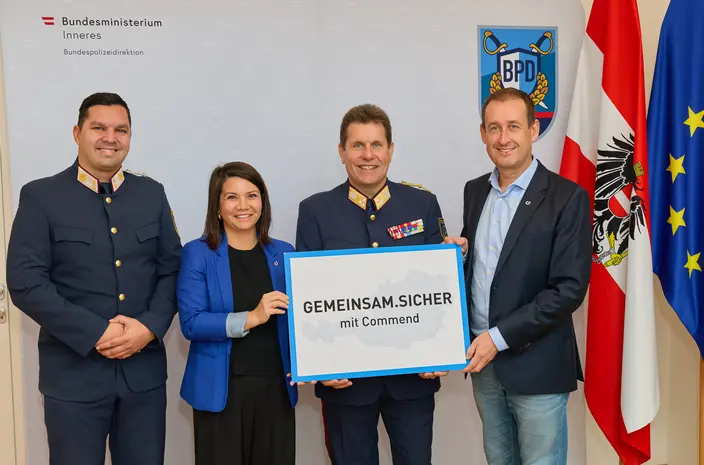
Austrian Ministry of the Interior and Commend launch new public-safety partnership
The Austrian Ministry of the Interior and Commend International have officially entered a new public-safety cooperation, marked by the recent signing in the Ministry’s offices in Vienna. Police Director Michael Takacs, together with Commend representatives Christine Bernroider and Klaus Hirschegger, set the foundation for a partnership focused on earlier risk detection and clearer communication in security-critical situations. The goal of the cooperation is to help emergency services gain a faster and more precise situational overview in public buildings, train stations, hospitals, and other high-traffic urban areas. By combining the Police’s operational experience with Commend’s long-standing expertise in secure communication, new solutions will be developed that improve safety for the public while supporting emergency teams in making quicker, more informed decisions. The partnership also marks the start of joint innovation efforts: the first collaborative public projects are already moving into concrete planning, aiming to deliver technology and workflows tailored directly to real-world operational needs. Copyright: BMI / Photographer Alexander TUMA

News
Symphony Config | Intercom Setup in Minutes
Tight budgets, rising customer expectations and limited technician availability have long made project implementation a challenge. Many deployments still require repeated on-site visits and deep technical know-how, slowing down delivery and increasing costs. Symphony Config , Commend’s new configuration tool, introduces a simplified setup process designed to cut project time dramatically. Its guided Quick Start Assistant leads users through the initial configuration step by step, reducing the need for detailed network or SIP knowledge. This approach reduces training requirements and helps even newcomers complete reliable setups. Integrators benefit from faster rollouts, fewer technician hours and central management of all customer projects. In addition, Active Device Management ensures that devices stay updated automatically, improving system security without additional maintenance effort. End users also gain more autonomy. They can adjust selected settings themselves without risking misconfiguration, thanks to role-based permissions. This video proofs that a complete setup can be completed within minutes, demonstrating the tool’s focus on practical efficiency:
Page
Inquiry
We will be happy to discuss your needs! Start your Project 23 Sales Organisations worldwide Always there, wherever you are America – Europe – Africa – Middle-East – Asia/Pacific
Page
Alcatel-Lucent | Intercom Interoperability
Commend Intercom Interoperability to Alcatel-Lucent – OmniPCX Enterprise Overview Commend devices like IP-Intercom stations, IP-Intercom modules, IP-Loudspeakers and IP-Amplifiers can be connected via SIP to Alcatel-Lucent and Commend Hard- and Software-Servers using SIP trunks. Registration DTMF-Support Calls G.711 μ-law G.711 a-law G.722 HD Audio Video Support VoIP Provider Yes Yes Yes No Yes No No No Short Profile Alcatel-Lucent's mission is to enable seamless connectivity by providing digital-age networking, communications, and cloud solutions tailored to their customers' success. Their strategy focuses on offering industry-specific solutions with built-in security and minimal environmental impact. With flexible business models, Alcatel-Lucent offers solutions in the cloud, on-premises, and hybrid environments. Backed by over 100 years of innovation, they are a trusted advisor to more than 830,000 customers worldwide. Source: Alcatel-Lucent Website (05.08.2020) Company Website The OmniPCX Enterprise Communication Server (CS) helps employees connect in real time whatever their location, and hold high-quality business calls with their colleagues and customers. Organizations can connect the OmniPCX Enterprise CS to the Alcatel-Lucent Rainbow cloud service. The Rainbow mobile, borderless collaboration application is the perfect companion to business phones and helps employees respond faster and better to business requests. Calls between Intercom stations and telephone system/telephones/clients are possible in both directions. Telephone (PBX) SIP Audio Overview
Page
3CX | Intercom Interoperability
Commend Intercom Interoperability to 3CX – The PhoneSystems for Windows Overview Commend devices like IP-Intercom stations, IP-Intercom modules, IP-Loudspeakers and IP-Amplifiers can be connected via SIP to 3CX PhoneSystem for Windows and Commend Hard- and Software-Servers using SIP trunks. Registration DTMF-Support Calls G.711 μ-law G.711 a-law G.722 HD Audio Video Support VoIP Provider Yes Yes Yes Yes Yes No No No Short Profile 3CX is a global leader in business VoIP and Unified Communications (UC) technology. It offers customers a simple, flexible and affordable solution that dramatically cuts telephony costs and management headaches. With 3CX you are guaranteed to increase productivity, reduce business travel and telco costs, streamline operations and improve customer service. 3CX customers know straight up what they will be spending: No per extension licensing, pay for simultaneous calls Self-host or run on own hardware on Windows or Linux Easily add and manage extensions Open-platform – choose your IP Phones & SIP trunks Source: 3CX Website (09.07.2020) Company Website LinkedIn Page With 3CX’s VoIP phones for Windows and the Web, you can manage your phone calls from your desktop or browser. Make, receive and transfer calls via the office phone system from your computer, even while out of the office. Using a headset you can even use a 3CX App as a full desk phone replacement. Calls between Intercom stations and 3CX are possible in both directions. Telephone (PBX) SIP Audio Overview
Page
AVM | Intercom Interoperability
Commend Intercom Interoperability to AVM – Fritz!Box Fon Overview Commend devices like IP-Intercom stations, IP-Intercom modules, IP-Loudspeakers and IP-Amplifiers can be connected via SIP to AVM and Commend Hard- and Software-Servers using SIP trunks. Registration DTMF-Support Calls G.711 μ-law G.711 a-law G.722 HD Audio Video Support VoIP Provider Yes Yes Yes Yes Yes No No No Short Profile AVM offers an extensive selection of products for high-speed broadband connectivity and smart home networking. With the FRITZ! product range, AVM is a leading manufacturer of broadband devices for DSL, cable, LTE (4G) and fiber optics in Germany and Europe. Our Smart Home products, based on wireless LAN, DECT and powerline standards, ensure an intelligent and secure home network. Thanks to the FRITZ!OS operating system, FRITZ! products are intuitive and easy to use. Regular free updates provide new functions for greater convenience and increased security. FRITZ! is the leading brand for home networking in Germany. Since it started out in Berlin in 1986, AVM's focus has been on developing secure, innovative products for broadband connections in-house. In 2019 the communications specialist had over 810 employees and generated a turnover of 530 million euros. Source: AVM Website (09.07.2020) Company Website Telephone (PBX) SIP Audio Overview
Page
Avaya | Intercom Interoperability
Commend Intercom Interoperability to Avaya Aura – The Communication and Session Manager Overview Commend devices like IP-Intercom stations, IP-Intercom modules, IP-Loudspeakers and IP-Amplifiers can be connected via SIP to Avaya's Aura platform and Commend Hard- and Software-Servers using SIP trunks. Registration DTMF-Support Calls G.711 μ-law G.711 a-law G.722 HD Audio Video Support VoIP Provider Yes Yes Yes Yes Yes No No No Short Profile Avaya is a transformative force in digital communications software, services, and devices, designed for businesses of all sizes. Through its open, converged, and innovative solutions, Avaya is taking intelligent experiences to new heights for customers, partners, and their customers—in the cloud, on-premise, or hybrid. Source: Avaya Website (08.07.2020) Company Website LinkedIn Page The Avaya Aura ® Platform delivers a different approach to engaged communications, transforming traditional, single-purpose solutions for voice, video, email and instant messaging into a true multimedia, multimodal architecture. Calls from Intercom stations to the telephone system/telephones are possible in both directions. Telephone (PBX) SIP Audio Overview